Canister filter hose and tube brush set
CleaningPick brushes that match your hose and inlet diameters. A long, flexible brush clears the length of the hose.
Reader-supported: some links on this page are affiliate links. As an Amazon Associate I earn from qualifying purchases, at no extra cost to you.
Clean only when flow drops, rinse media gently in tank water, keep it wet and in order, and keep a spare o-ring on hand. The manual always comes first.
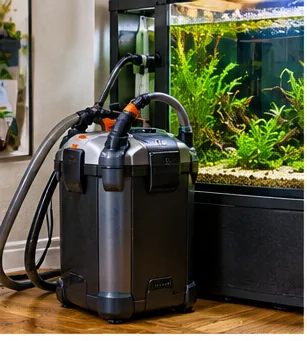
To clean a canister filter without wrecking the cycle, switch it off, open it over a towel, rinse the media gently in tank water instead of the tap, brush the hoses and the impeller well, check the seals and restart it. Do it only when flow drops or the manual says so, and never replace all the media at once. The right tools and a few spare parts make the job quick.
A canister filter does not need a calendar clean-out. It needs attention when flow drops, when the manual calls for service, or when you see debris in the baskets. Cleaning too often removes the beneficial bacteria living in the media, and cleaning too rarely lets debris choke the flow. The practical signal is the water coming out of the spray bar or outlet, which will be slower or weaker when the filter needs work.
Many keepers also avoid stacking jobs. If you are changing a large volume of water or vacuuming the substrate, do the filter on another day so that the tank is not disturbed all at once. For how the media sits in the baskets, see our filter media order guide. For the nitrogen cycle that the media supports, see the nitrogen cycle guide.
Pick brushes that match your hose and inlet diameters. A long, flexible brush clears the length of the hose.
Search by the exact model of your filter, and compare the listing against the part in your manual. Parts rarely fit across models.
Fine mesh with a drawstring keeps media together and makes rinsing easier. Check that the size fits your baskets.
While the media soaks, give the impeller area some attention. Remove the impeller cover and rotor as the manual describes, and wipe away slime and debris with a soft brush. Look at the rotor and shaft for chips, cracks or a wobble. If it looks worn or sounds rough when you spin it by hand, a replacement part for your exact model is cheaper than a failed pump. Run the hose brush through each hose and the spray bar or outlet pipe, and rinse the hoses with tank water until the rinse runs clear.
Beneficial bacteria need moving, oxygenated water, so aim to have the media back in a running filter quickly. Lay everything out before you start, so you are not hunting for a part with wet media waiting in a bucket. If something goes wrong, such as a cracked part or a missing o-ring, put the media in a bucket of tank water with a battery or powered air pump until you have the replacement. Our power-outage plan covers how to keep water moving when a filter is out of action.
The media is where most of the filter's beneficial bacteria live, so treat it gently. A common practice is to rinse it in a bucket of water drained from the tank instead of under the tap, because tap water can contain disinfectants. Check your filter's manual for the maker's advice. Squeeze sponges and swish ceramic or bio media until the loose debris comes off. You are not trying to make it look new.
Replace only what is worn. Some media, such as filter floss or carbon, is designed to be replaced, and some, such as sponges and ceramic rings, can be rinsed and reused for a long time. Many keepers stagger replacement so that not everything is swapped on the same day. Keep the media wet and out of direct sunlight while you work, and return it to the baskets in the same order. Our canister filter guide compares basket and bucket designs and how easily each is serviced.
The o-ring is the most common source of leaks after a clean. Wipe the groove and the ring, look for flat spots or cracks, and replace it if it is worn. Some makers call for a thin film of aquarium-safe lubricant on the ring and others do not, so follow the manual. Reassemble, reconnect the hoses, open the valves, and prime the filter as the manual describes.
Watch the hoses and the seal for several minutes after restart, and check again an hour later. Leave a dry towel under the canister for the first day. Keep the cord in a drip loop and dry hands on the plug. If the canister is noisy or air-locked, switch off, and bleed air as the manual instructs.
While the filter is open, wipe the lid, the seal seat and the outside of the canister with a damp cloth, and rinse the spray bar or outlet pipe if the manual allows. A film of dust and salt creep on the outside can hide a slow leak, and a clean canister makes any later drip easier to spot. Return the canister to its cabinet with the hoses free of kinks, and check that nothing is pressing against the valves.
When flow drops, when debris builds up in the baskets, or on the schedule in your manual. There is no single calendar interval that suits every tank.
A common practice is to rinse it in water taken from the tank, because tap water can contain disinfectants. Check your filter's manual for the maker's advice.
No. Replace only media designed to be replaced or media that has worn out, and avoid swapping everything at once.
An o-ring and gaskets for your exact model, and a hose brush. Parts rarely fit across models, so match them by model name.
Switch it off and unplug it, then check the o-ring seat for dirt, flat spots or damage, and follow the manual for reassembly.
This is a maintenance walkthrough based on general canister filter practice. It cites no external study and quotes no flow rates, intervals or part numbers. Opening, priming, lubricating and electrical steps differ by model, so your manual is the authority.
Heads-up: AquariumSetup.co participates in the Amazon Associates and eBay Partner Network programs. We may earn a commission on qualifying purchases at no extra cost to you. We only recommend gear we believe is genuinely useful to beginners.